Role

Product Designer

Client

Atlas Shippers

Duration

4 months

Helping families track balikbayan boxes across the Pacific

Helping families track balikbayan boxes across the Pacific

Designed alongside the co-owner of Atlas Shippers International.

Designed alongside the co-owner of Atlas Shippers International.

Atlas mobile screens showing box tracking input, an at-sea arrival estimate, and completed delivery.

PROBLEM

The Atlas tracker isn’t built for phones and doesn’t remember your box between visits, while families wait weeks, sometimes months, for it to arrive.

The Atlas tracker isn’t built for phones and doesn’t remember your box between visits, while families wait weeks, sometimes months, for it to arrive.

SOLUTION

A mobile tracker that leads with the delivery window, shows the ship’s route across the Pacific, and saves every box.

A mobile tracker that leads with the delivery window, shows the ship’s route across the Pacific, and saves every box.

DELIVERABLES

UX audit, pattern research, high-fidelity screens and a clickable prototype.

UX audit, pattern research, high-fidelity screens and a clickable prototype.

Where this started

In February 2025, I sent a box to my niece in the Philippines with Atlas. It took four months to arrive, and the tracker told me almost nothing along the way.

February. I dropped the box off at the Livermore facility.

No updates. No texts or status changes; I tracked it by calling customer service.

Early June. My niece finally received the box.

Overview

Overview

Atlas Shippers International ships door-to-door cargo from the United States to the Philippines. Most customers send balikbayan boxes: large boxes of goods packed for family back home. After pickup, a box moves from a US warehouse onto a container ship, across the Pacific, through customs at the Port of Manila, and out to a local delivery hub.

For the sender and the family waiting on the other end, the online tracker is the only view into that trip. I led the redesign of the tracking flow end to end, from auditing the current page to a working prototype, working alongside Richelle, co-owner of Atlas.

Opportunity

Opportunity

Families need a clear answer to the question they ask for weeks: where is my box, and when will it arrive?

Defining the problem

Auditing the live tracker at a 375px phone width, five problems emerged. The pins on the screen match each finding.

A. No mobile layout: The desktop page is scaled down to fit. Text renders at roughly 5–7px and the Search button is about 20px tall.

A. No mobile layout: The desktop page is scaled down to fit. Text renders at roughly 5–7px and the Search button is about 20px tall.

B. Promo before the task: An app-download banner fills the top third of the screen, above the one thing people came to do.

B. Promo before the task: An app-download banner fills the top third of the screen, above the one thing people came to do.

C. A bare input: No example format, no hint where to find the invoice number, no way to scan the receipt.

C. A bare input: No example format, no hint where to find the invoice number, no way to scan the receipt.

D. Starts from zero every time: No saved boxes. Returning senders retype the number on every visit.

D. Starts from zero every time: No saved boxes. Returning senders retype the number on every visit.

E. Signs of neglect: A mostly empty screen, a reCAPTCHA badge over the footer, and a broken “©?1993–2021” copyright line all erode trust.

E. Signs of neglect: A mostly empty screen, a reCAPTCHA badge over the footer, and a broken “©?1993–2021” copyright line all erode trust.

Original Atlas mobile tracker with A–E audit markers around the promo banner, navigation, tiny input, and empty space.

The problem: Senders and receivers who check on a box for weeks or months have no phone-friendly way to see where it is or when it will arrive, and no updates unless they call customer service.

The goal

Redesign the tracker into a mobile-first experience that answers that question at a glance, remembers each box between visits, and keeps both the sender and the receiver updated without a call to customer service.

Learning from apps people already use

Learning from apps people already use

I studied tracking screens on Mobbin, mostly from food and parcel delivery, where arrival is minutes away. A balikbayan box takes weeks, so I adapted each pattern instead of copying it.

  • Arrival window as the headline (Glovo, Keeta): the tracker leads with a range of days that narrows as the box moves.

  • Arrival window as the headline (Glovo, Keeta): the tracker leads with a range of days that narrows as the box moves.

  • Map with a bottom sheet (Careem, Uber Eats): the map shows the Pacific crossing from Long Beach to Manila instead of streets.

  • Map with a bottom sheet (Careem, Uber Eats): the map shows the Pacific crossing from Long Beach to Manila instead of streets.

  • Progress with an icon for each step (Instacart, Grab): four icons for picked up, at sea, in the Philippines and delivered.

  • Progress with an icon for each step (Instacart, Grab): four icons for picked up, at sea, in the Philippines and delivered.

  • Active orders as home cards (Shop, Hims): each saved box becomes a card with the receiver, arrival window and progress.

  • Active orders as home cards (Shop, Hims): each saved box becomes a card with the receiver, arrival window and progress.

  • Tracking input with scan (Klarna, Lyft): a scan button inside the field reads the number off the paper receipt.

  • Tracking input with scan (Klarna, Lyft): a scan button inside the field reads the number off the paper receipt.

Designing and prototyping

Designing and prototyping

I used Claude as a working tool on this project, for research, synthesis, and building the prototype. The problem framing, the flow, and what made the final design were my decisions, shaped by feedback from Richelle.

Answer first

Logistics systems log a dozen internal events. The status screen groups them into four stages and leads with a delivery window, such as “Oct 18 – 22.” Sea freight and customs can shift by days, so a window sets an honest expectation. The full event log sits underneath for people who want it.

The ocean is the map

The status screen opens on the ship’s route across the Pacific. It gives a long, uneventful wait a visible sense of progress.

An input that helps

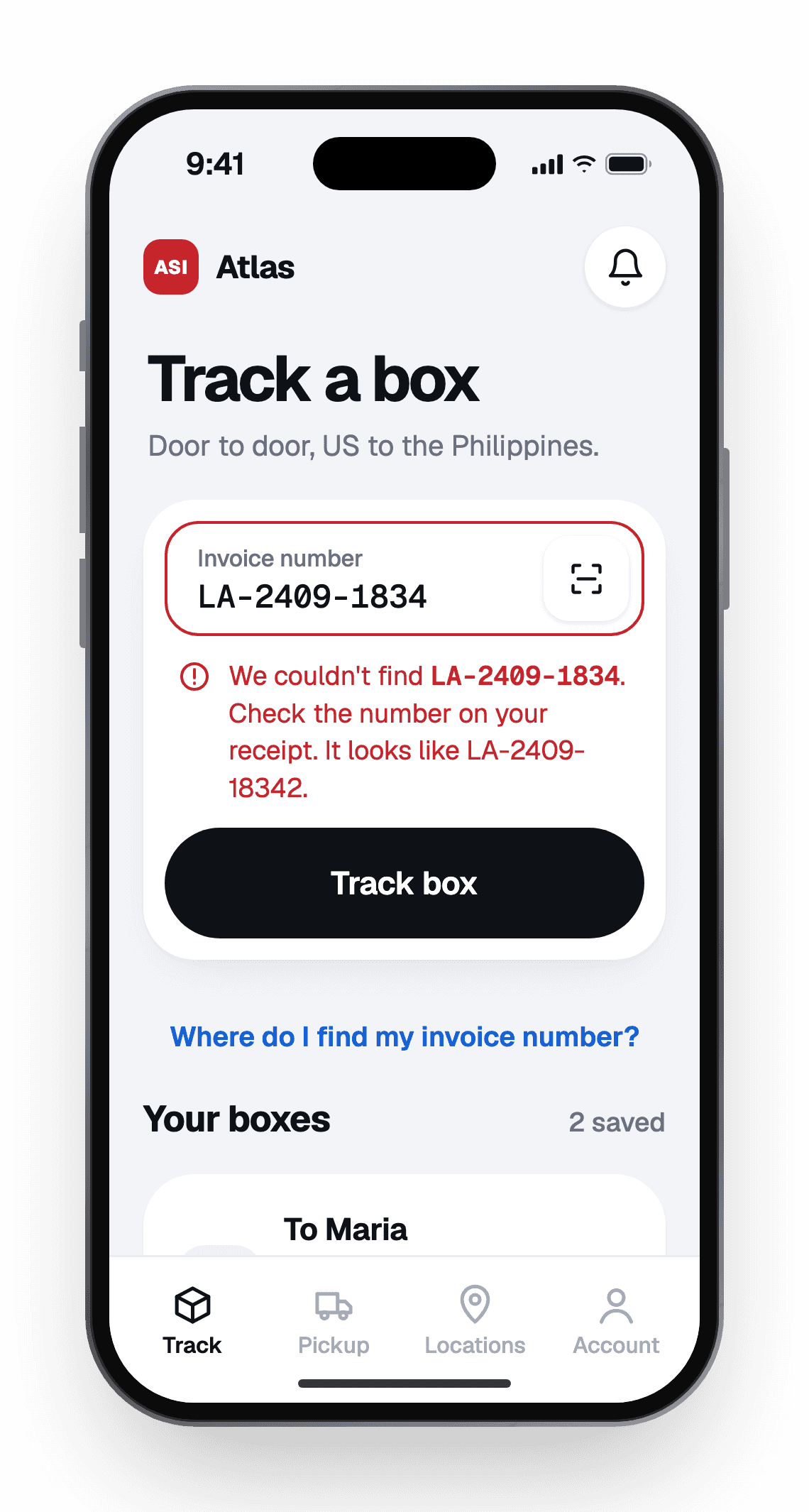
The tracker opens straight to the invoice field, with an example format, a “Where do I find my invoice number?” helper and a scan button. When a number isn’t found, the error repeats what was typed and shows what a valid number looks like.

Box tracking screen with invoice input and expanded receipt help highlighting the invoice number at the top right.
Box tracking error showing the unrecognized invoice number and guidance on the expected number format.

Boxes that stay

Every tracked box is saved to the home screen until it’s delivered. Step notifications and a share link keep the receiver in the Philippines informed too. This is the gap I ran into as a sender: in four months, I never got a text update.

Four Atlas screens showing invoice help, an at-sea arrival window, signed delivery confirmation, and a not-found error.

Outcomes and next steps

Outcomes and next steps

Before and after

The same task in both versions: entering an invoice number on a phone.

Before-and-after Atlas tracker: promo-heavy page with a tiny input versus input-first design with scanning and saved boxes.

Measuring success

I don’t have production metrics to share yet. These are the signals I’d track with the Atlas team:

  • Fewer “Where’s my box?” calls: support calls and messages asking for shipment status.

  • Fewer “Where’s my box?” calls: support calls and messages asking for shipment status.

  • Repeat tracking from saved boxes: share of visits that open a saved box instead of retyping.

  • Repeat tracking from saved boxes: share of visits that open a saved box instead of retyping.

  • Receivers reached: share links opened and notifications turned on.

  • Receivers reached: share links opened and notifications turned on.

What I’d do next

  • Run usability sessions with senders and receivers.

  • Run usability sessions with senders and receivers.

  • Map Atlas’s real shipment events onto the four stages and check how often the delivery window is right.

  • Map Atlas’s real shipment events onto the four stages and check how often the delivery window is right.

  • Add Tagalog and Cebuano for receivers in the Philippines.

  • Add Tagalog and Cebuano for receivers in the Philippines.

  • Design SMS updates for receivers who won’t install an app.

  • Design SMS updates for receivers who won’t install an app.

This project taught me to design for a long wait, where the most useful thing a tracker can do is set an honest expectation and keep people updated along the way.